
Overview
You can use this endpoint to update the values of the Tax Total, Other Total, Shipping Total, and Shipping Total Third Party fields of a single existing Purchase Order.
To consume it, you must be an authenticated user. For instructions, see our Authentication article.
Endpoint
Example for this endpoint for server XX is:
https://xx.api.sellercloud.com/rest/api/PurchaseOrders/{id}/Total
For your server, the endpoint will be:
https://{your_server_id}.api.sellercloud.com/rest/api/PurchaseOrders/{id}/Total
Request
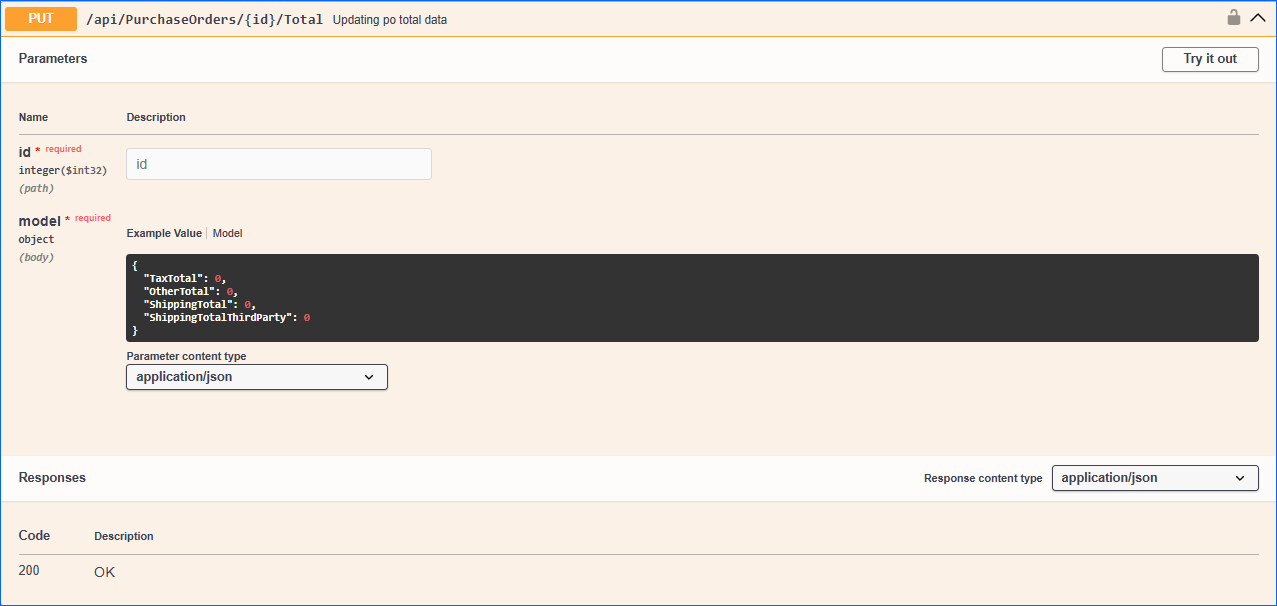
- Method Type: HttpPut
- Authorization: Use Bearer Token + token received from token authentication
- Header info: Content-Type: application/json
- Path: ID of an existing Purchase Order.
- Body data:
Parameter Data Type Description Is Required TaxTotal integer Won’t update if not provided. No OtherTotal integer Won’t update if not provided. No ShippingTotal integer The Shipping Total can only be updated when the client setting Enable Per Session Receiving Cost For PO is disabled. Won’t update if not provided. No ShippingTotalThirdParty integer Cannot be updated if the setting Enable Free Shipping for Purchase Orders is enabled and the PO is partially or fully received. Won’t update if not provided. No
Response
- If the user is authenticated and the document upload is successful, then the response will be Status Code 200 => OK
- If an incorrect FileName or FileContent is provided, then the response will be Status Code 400 => Bad Request
- If the user is not authenticated, then the response will be Status Code 401 => Not Valid Token
- In case of error, the response will be Status Code 500 => Internal Server Error