
Overview
This endpoint allows you to create a single new sales order. To consume it, you must be an Authenticated User. As soon as you receive a valid token, you need to pass it to the call.
To mark an order as paid after its creation, you can utilize one of the following endpoints:
Endpoint
An example of such an endpoint for XX server is:
https://xx.api.sellercloud.com/rest/api/Orders/
For your server, the endpoint will be:
https://{your_server_id}.api.sellercloud.com/rest/api/Orders/
Request
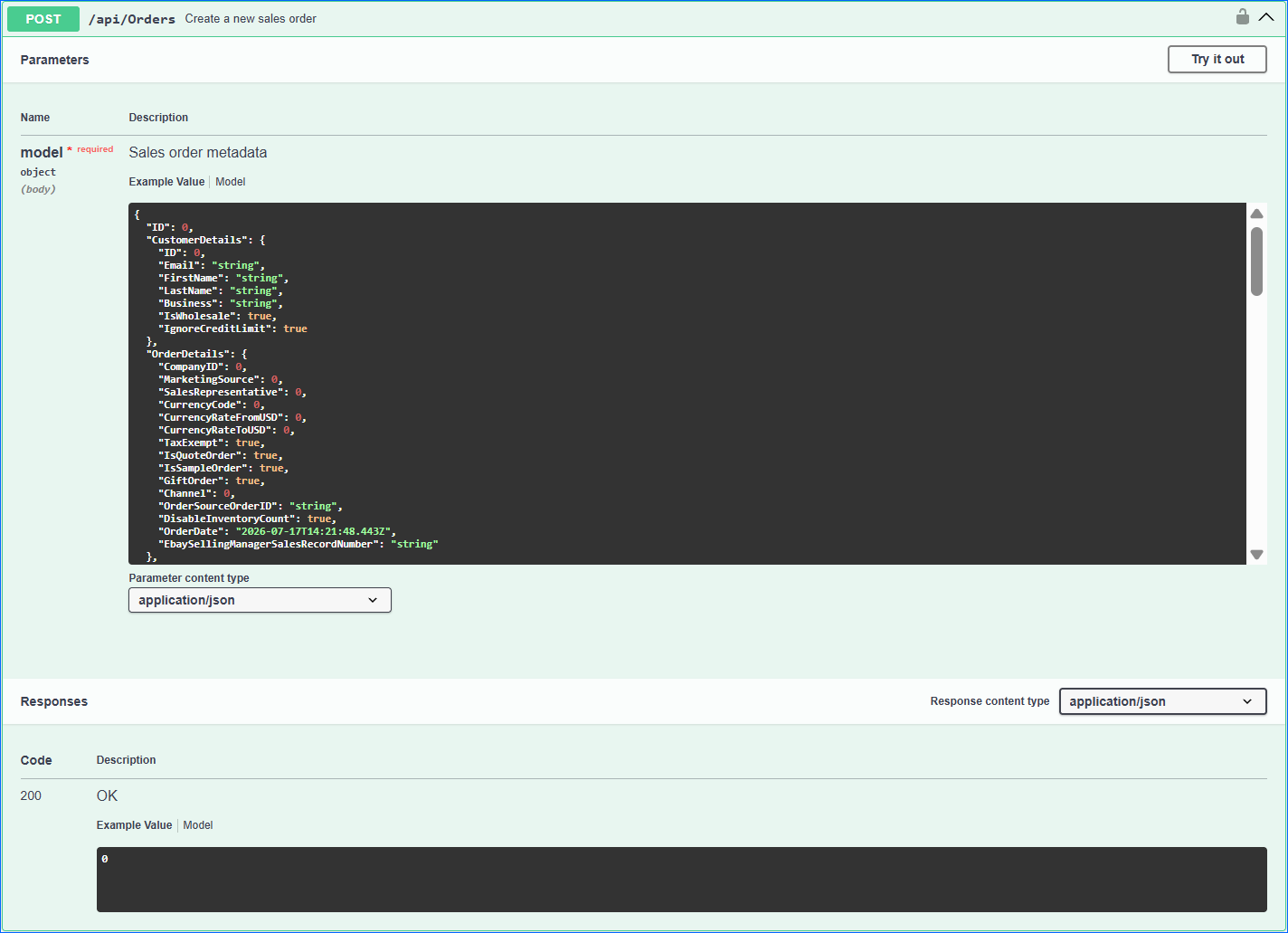
- Method Type: HttpPost
- Authorization: Use Bearer Token + token received from token authentication
- Header info: Content-Type: application/json
- Request Body:
| Parameter | Data Type | Description | Is Required |
| ID | integer | Can be set to “null” | No |
| CustomerDetails | “CustomerDetails”: {
“ID”: 0, “Email”: “string”, “FirstName”: “string”, “LastName”: “string”, “Business”: “string”, “IsWholesale”: true }, |
Information about the customer.
FirstName, LastName, and Email are mandatory fields. The ID is the unique customer number in the Sellercloud system. IsWholesale indicates if the customer is marked as wholesale. |
Yes |
| OrderDetails | “OrderDetails”: {
“CompanyID”: 0, “MarketingSource”: 0, “SalesRepresentative”: 0, “TaxExempt”: true, “GiftOrder”: true, “Channel”: 0, “OrderSourceOrderID”: “string”, “DisableInventoryCount”: true, “OrderDate”: “2021-02-08T14:04:35.726Z”, “EbaySellingManagerSalesRecordNumber”: “string” }, |
Basic information about the order.
The ID of the company is mandatory. The channel is mandatory: Local_Store = 0, Website = 6 Wholesale = 21 DisableInventoryCount – optional; do not provide or set to null if no value needs to be specified. OrderDate – time of order (optional). EbaySellingManagerSalesRecordNumber – eBay selling manager sales record number (optional). |
Yes |
| ShippingAddress | object | Shipping Address | Yes |
| BillingAddress | object | Billing Address | Yes |
| ShippingMethodDetails | object | Shipping information like carrier, service method, weight and dimensions, handling, shipping, payment required for shipping, and insurance fee. | No |
| Notes | object | Order notes | No |
| Products | List | List of products including product ID, name, price, qty, discount, etc. | No |
| GiftDetails | object | Gift information: gift message, gift wrap fee, etc. | No |
Order creation is allowed only for Local Store, Website, and Wholesale order sources.
Request Body
{
  "ID": 0,
  "CustomerDetails": {
    "ID": 0,
    "Email": "string",
    "FirstName": "string",
    "LastName": "string",
    "Business": "string",
    "IsWholesale": true,
    "IgnoreCreditLimit": true
  },
  "OrderDetails": {
    "CompanyID": 0,
    "MarketingSource": 0,
    "SalesRepresentative": 0,
    "CurrencyCode": 0,
    "CurrencyRateFromUSD": 0,
    "CurrencyRateToUSD": 0,
    "TaxExempt": true,
    "IsQuoteOrder": true,
    "IsSampleOrder": true,
    "GiftOrder": true,
    "Channel": 0,
    "OrderSourceOrderID": "string",
    "DisableInventoryCount": true,
    "OrderDate": "2026-07-17T14:21:48.443Z",
    "EbaySellingManagerSalesRecordNumber": "string"
  },
  "GiftDetails": {
    "UseGiftWrap": true,
    "GiftMessage": "string",
    "GiftWrap": 0,
    "GiftWrapType": "string"
  },
  "Products": [
    {
      "ProductID": "string",
      "ReferenceID": "string",
      "ProductName": "string",
      "SitePrice": 0,
      "DiscountValue": 0,
      "DiscountType": 0,
      "Qty": 0,
      "LineTaxTotal": 0,
      "FinalValueFee": 0,
      "Notes": "string",
      "ShipFromWareHouseID": 0,
      "PricePerCase": 0,
      "TotalCases": 0,
      "QtyPerCase": 0
    }
  ],
  "ShippingAddress": {
    "Business": "string",
    "FirstName": "string",
    "MiddleName": "string",
    "LastName": "string",
    "Country": "string",
    "City": "string",
    "State": "string",
    "Region": "string",
    "ZipCode": "string",
    "Address": "string",
    "Address2": "string",
    "Phone": "string",
    "Fax": "string",
    "btnShowRealAddressVisible": true,
    "RealShippingAddress": "string"
  },
  "BillingAddress": {
    "Business": "string",
    "FirstName": "string",
    "MiddleName": "string",
    "LastName": "string",
    "Country": "string",
    "City": "string",
    "State": "string",
    "Region": "string",
    "ZipCode": "string",
    "Address": "string",
    "Address2": "string",
    "Phone": "string",
    "Fax": "string",
    "btnShowRealAddressVisible": true,
    "RealShippingAddress": "string"
  },
  "ShippingMethodDetails": {
    "Carrier": "string",
    "ShippingMethod": "string",
    "Weight": {
      "Pounds": 0,
      "Ounces": 0
    },
    "Dimension": {
      "Width": 0,
      "Height": 0,
      "Length": 0
    },
    "HandlingFee": 0,
    "ShippingFee": 0,
    "InsuranceFee": 0,
    "LockShippingMethod": true,
    "RushOrder": true,
    "RequirePinToShip": true,
    "OtherCarrier": "string",
    "OtherMethod": "string",
    "PromiseDate": "2026-07-17T14:21:48.443Z",
    "AllowShippingEvenNotPaid": true
  },
  "Notes": [
    {
      "EntityID": 0,
      "Category": 0,
      "NoteID": 0,
      "Note": "string",
      "AuditDate": "2026-07-17T14:21:48.443Z",
      "CreatedBy": 0,
      "CreatedByName": "string",
      "CreatedByEmail": "string",
      "UsersToNotify": [
        0
      ],
      "UserNamesToNotify": [
        "string"
      ],
      "IsPinned": true,
      "AllowEditPinnedOrder": true
    }
  ]
}
Response
- If the user is authenticated and provides a valid page number and page size, then the response will be Status Code 200 => OK.
- If the user is not authenticated, then the response will be Status Code 401 => Not Valid Token.
- In case of an error, the response will be Status Code 500 => Internal Server Error.
Enumerations
Order Note Category:
- General = 0
- Customer_Instructions = 1
- Customer_Service_Note = 2